
Instructional Design Document
The Instructional Design Document (IDD) provides a framework that guides all key individuals involved in the eLearning development process. It serves as a guidebook for key individuals, stakeholders, subject matter experts, and peers collaborating on the learning experience.

Minicourse Idea
Course Title: Web Basics
Course Overview
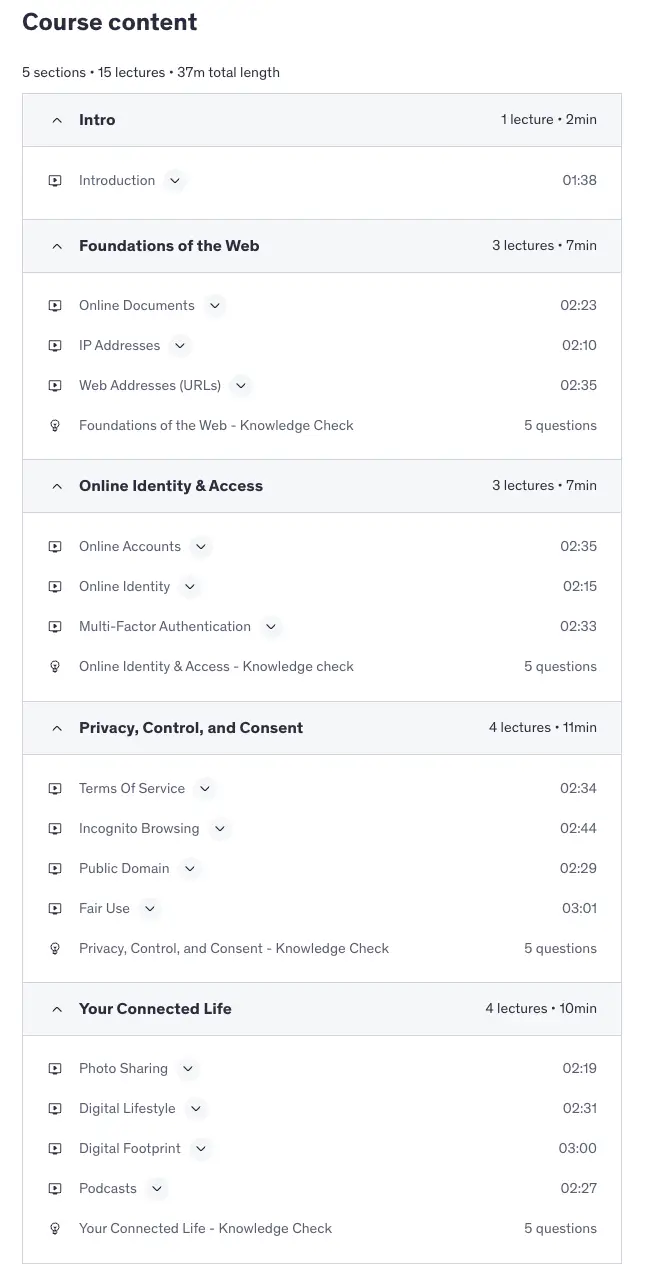
The Web Basics minicourse is designed to equip adult learners with the essential knowledge and skills needed to navigate the internet safely and confidently. It covers core topics such as identifying secure websites, protecting online identity, understanding cookies and data privacy, and using tools like multi-factor authentication. Through practical, real-world examples and clear explanations, the course aims to close foundational digital literacy gaps, reduce online risks, and build lasting confidence in everyday web use.
Knowledge Gap
Many adult internet users regularly browse, shop, and communicate online but lack a clear understanding of how core web concepts work, such as secure browsing, data privacy, cookies, and multi-factor authentication. This knowledge gap leaves them vulnerable to scams, identity theft, and other online threats, while also limiting their confidence to engage with more advanced digital tasks. The minicourse will address this gap by providing practical, easy-to-apply guidance that empowers learners to make informed, safe, and confident decisions online.
Web Basics is designed to close this gap. The course covers practical topics such as online documents vs. local storage, IP addresses, secure browsing, cookies, privacy settings, managing online accounts, and understanding the digital footprint. Each topic is structured to build confidence and fluency, helping learners navigate the web more safely and make informed digital choices.
This course is especially relevant for adult learners in corporate or everyday contexts who may be comfortable using the internet superficially (email, browsing) but lack the deeper understanding needed to manage risks or adapt to more complex digital tasks.
Target Audience
The Web Basics minicourse is designed for adult learners who regularly use the internet but lack a clear understanding of foundational digital concepts.
Learner Profile
The typical learner profile includes the following characteristics:
- Demographics: Adults aged 25-55, often working professionals, job seekers, or individuals pursuing continuing education. They may come from diverse industries where digital tools are now essential but not always supported with formal training.
- Background or Prior Knowledge: Most have basic experience using the internet for everyday activities such as email, browsing, or online shopping. However, their understanding is largely functional rather than conceptual, leaving gaps in knowledge about security, privacy, and safe online practices.
- Skills: Learners can navigate common platforms (e.g., web browsers, email clients) but may not know how to evaluate secure websites, manage cookies, or interpret warnings about unsafe links.
- Dispositions: They are motivated to improve their digital confidence, often because of workplace demands, personal interest, or concern about online safety. Many may also feel some anxiety or uncertainty about technology and need a supportive, accessible learning experience.
- Other Considerations: Learners may have varying levels of access to technology, so materials must be designed for clarity and ease of use. They are likely to value practical, real-world applications that can be immediately applied in daily life and work settings.
This audience profile emphasizes adults who are not digital experts but recognize the importance of strengthening their foundational web literacy to stay safe, confident, and effective in a technology-driven world.
Course Type
The Web Basics minicourse will be designed as an Informational Course with elements of a How-To Course. Its primary focus is to provide foundational knowledge about safe and effective internet use, covering topics such as recognizing secure websites, understanding cookies, protecting online identity, and enabling multi-factor authentication.
Alongside knowledge delivery, the course will also include practical demonstrations and short activities that show learners how to apply these concepts in real-world settings, such as identifying phishing emails or checking browser security indicators.
This type of course is best suited to the learning gap identified, where adult learners already use the internet daily but lack structured knowledge and skills to do so safely and confidently. By combining clear explanations with practical application, the course will close this gap in a concise, accessible way that directly addresses their needs.
Course Modality
The Web Basics minicourse will be delivered in an Asynchronous Online modality. Learners will be able to access the course materials at their own pace, allowing them to review concepts and complete activities at times that fit their schedules. This flexibility is essential for the target audience, many of whom are busy adults balancing work and personal responsibilities while seeking to improve their digital confidence.
Asynchronous delivery also supports the use of multimedia resources—short explainer videos, interactive exercises, and scenario-based assessments—that can be revisited as needed. This modality ensures accessibility for learners with different levels of prior knowledge and provides the time and space for learners to practice skills, such as identifying phishing attempts or recognizing secure websites, without the pressure of real-time participation.
This approach is the best option for the identified learning gap because it accommodates diverse learner needs, provides broad access regardless of location or schedule, and maximizes learner autonomy in building foundational web literacy skills.
Course Learning Outcomes (CLOs)
By the end of this course, learners will be able to:
- By the end of this course, Learners will evaluate email messages and website indicators to distinguish between secure and insecure online communication.
- By the end of this course, learners will apply safe browsing practices, including authentication strategies, to protect personal information in digital contexts.
Sample Alignment
Module 3: Online Identity & Access
Learning Objectives Aligned with Learning Outcomes
Course Learning Outcomes (CLOs):
- CLO 1: Learners will evaluate email messages and website indicators to distinguish between secure and insecure online communication.
- CLO 2: Learners will apply safe browsing practices, including authentication strategies, to protect personal information in digital contexts.
Module Title:
Online Identity & Access
Module Learning Objectives (MLOs):
By the end of this module, learners will be able to:
- Identify elements of strong vs. weak online credentials with 100% accuracy using a password strength tool. (Aligns with CLO 2)
- Describe how online identity is formed and summarize at least three risks of oversharing personal information in a reflection activity. (Aligns with CLO 1, CLO 2)
- Implement the steps for enabling multi-factor authentication (MFA) on a mock platform and explain two benefits of MFA in a short response. (Aligns with CLO 2)
- Analyze four sample login attempts and differentiate legitimate vs. fraudulent access with at least 80% accuracy. (Aligns with CLO 1, CLO 2)
Content & Activities:
Content:
- Video: Online accounts, digital identity, authentication basics.
- Reading: “Best Practices for Protecting Your Online Identity.”
- Guided tutorial: Enabling MFA.
Learning Activities:
- Password Strength Tool (Interactive): Learners test example passwords and receive instant feedback (aligns with Objective 1).
- Identity Risks Reflection (Discussion): Learners list how personal data shapes identity and summarize at least three risks (aligns with Objective 2).
- MFA Simulation (Guided Activity): Learners enable MFA on a mock account and provide two benefits in writing (aligns with Objective 3).
- Login Attempt Analysis (Scenario-Based Case Study): Learners classify access attempts and justify choices, meeting 80% accuracy (aligns with Objective 4).
Assessment Strategy
- Password Strength Challenge: Auto-graded interactive task; learners must build a password that meets all five security criteria and score 100% on the strength analyzer tool (aligns with Objective 1).
- Digital Identity Risk Checklist: Self-assessment checklist; learners identify at least three oversharing risks in a simulated profile and receive automated feedback comparing their responses to best practices (aligns with Objective 2).
- MFA Walkthrough Quiz: Auto-graded simulation; after completing the guided MFA setup, learners answer five application questions and must score 80% or higher (aligns with Objective 3).
- Login Security Scenario: Case-based branching quiz; learners review four login attempt scenarios, make decisions on whether to grant or deny access, and must classify at least three correctly to pass (aligns with Objective 4).
Assessment Alignment
| Module Learning Objective (MLO) | Learning Activity | Assessment Strategy |
|---|---|---|
| Objective 1: Identify elements of strong vs. weak online credentials with 100% accuracy using a password strength tool. | Password Strength Tool (Interactive) – Learners test and refine example passwords with instant system feedback. | Password Strength Challenge – Auto-graded task; learners must build a password that meets all five security criteria and score 100% on the strength analyzer. |
| Objective 2: Describe how online identity is formed and summarize at least three risks of oversharing personal information in a reflection activity. | Identity Risks Reflection (Discussion Simulation) – Learners review a mock social media profile and highlight risky oversharing. | Digital Identity Risk Checklist – Self-assessment; learners identify at least three oversharing risks in the simulated profile and receive automated feedback. |
| Objective 3: Implement the steps for enabling multi-factor authentication (MFA) on a mock platform and explain two benefits of MFA in a short response. | MFA Simulation (Guided Activity) – Learners enable MFA in a mock system and observe the security impact. | MFA Walkthrough Quiz – Auto-graded; after completing the simulation, learners answer five application questions and must score 80% or higher. |
| Objective 4: Analyze four sample login attempts and differentiate legitimate vs. fraudulent access with at least 80% accuracy. | Login Attempt Analysis (Case Study) – Learners classify login attempts as secure or suspicious with reasoning. | Login Security Scenario – Branching quiz; learners evaluate four login attempts, making decisions to grant or deny access, and must classify at least three correctly. |
Subject Matter Expert/Resources
Creating a minicourse on web safety requires grounding the content in accurate expertise and reliable resources. While I bring instructional design knowledge and personal experience with digital literacy, it is essential to combine these with subject matter expertise and authoritative sources to ensure the course is both credible and practical.
To obtain subject matter expertise, I would collaborate with a cybersecurity professional who can validate technical details, review draft content, and provide insight into current threats and best practices. Alongside SME consultation, I will draw on at least three authoritative resources to guide and strengthen the course content: the Cybersecurity & Infrastructure Security Agency (CISA) for official alerts and best practices, the Google Safety Center for practical, widely used tools and tutorials, and Phishing.org for concrete examples of phishing attempts that can inform scenario-based activities.
This combination of SME validation and curated resources ensures the minicourse will be accurate, engaging, and directly applicable to the everyday online practices of learners.
SMEs & Resources for the Web Basics minicourse
1. Subject Matter Expert
Cybersecurity Professional (SME): Collaborating with a cybersecurity expert ensures the course materials are technically accurate and aligned with industry standards. Their input validates simulated activities, such as spotting phishing attempts or enabling multi-factor authentication, making them both credible and realistic.
2. Government/Nonprofit Sources
- Cybersecurity & Infrastructure Security Agency (CISA): Publishes official alerts, guides, and best practices for protecting digital identity and online safety. Its authority ensures the course reflects up-to-date threat information.
- StaySafeOnline (National Cybersecurity Alliance): Provides accessible, practical tips for internet safety and digital literacy. Its nonprofit orientation ensures content is geared toward learners at all levels, not just technical audiences.
3. Industry/Corporate Sources
Google Safety Center: Offers tutorials on securing accounts, managing cookies, and enabling two-factor authentication. Because learners often use Google services, this content is highly relevant and transferable to their daily lives.
4. Specialized Site
Phishing.org: Dedicated to phishing education, this site supplies concrete examples and visuals of real phishing attempts. It is ideal for creating simulation-based activities that allow learners to practice identifying scams in a safe environment.
Instructional Design Models
SAM1 (Basic Successive Approximation Model) with a
UbD backbone
- Why SAM1? Web Basics is short, skills-focused, and must stay current as phishing tactics change. SAM's rapid prototyping + frequent feedback lets us test scenarios early (alpha), refine quickly (beta), and polish for rollout (gold) without waiting for a long linear cycle. Choosing the lighter SAM1 keeps the cadence lean for a minicourse.
- Why add UbD? UbD gives it the backward-design spine: I lock the course outcomes and acceptable evidence first (e.g., “identify phishing in authentic emails,” “verify site security”), then let SAM's iterations optimize activities to hit those outcomes. This pairing protects depth and alignment while staying agile.
Fit with course constraints
- Learning objectives: Outcomes require authentic performance (evaluate emails, verify HTTPS, enable 2FA). UbD defines that evidence; SAM prototypes those tasks fast and improves them with real learner input.
- Content characteristics: Medium complexity but high volatility (threats evolve). SAM's cycles support continuous updates without a full redesign.
- Learner profile & modality: Busy adults, asynchronous microlearning. SAM favors small, testable chunks; UbD ensures each chunk rolls up to enduring understandings.
- Resources & timeline: Limited production time. SAM1 limits ceremony (short prep → design prototype → iterate) while reusing assets (screenshots, browser captures).
- Evaluation: Built-in formative evaluation each cycle; brief post-course checks (e.g., scenario accuracy, behavior change) to confirm outcomes.
Why not choose the others as the primary model?
- ADDIE: Reliable, but the linear flow and documentation load are slow for a minicourse that needs frequent updates.
- Dick & Carey: Excellent for precision mapping of sub-skills, but too heavy for the scope; I can borrow its task analysis during SAM's Preparation phase when needed.
- Rapid Instructional Design (RID): Fast and cost-effective, but on its own it risks shallow assessment. Pairing SAM with UbD keeps speed and authentic evidence.
How I'll operationalize the hybrid:
- Preparation (SAM1) + UbD Stage 1-2: Confirm outcomes/evidence; run a quick task analysis for phishing, HTTPS, cookies, 2FA.
- Iterative Design: Build low-fi prototypes (storyboards, clickable mockups) of:
- Phishing Email Simulation (CLO2, CLO5)
- Spot the Secure Website (CLO1, CLO4)
- 2FA Walkthrough (CLO3, CLO4)
- Collect SME + learner feedback within 48-72 hours.
- Iterative Development: Move to Alpha → Beta → Gold for the strongest prototypes; run short usability checks and accessibility reviews each cycle.
- Rollout & Refresh: After launch, schedule monthly micro-updates (new phishing examples, new browser warnings) without touching the whole course.
Bottom line:
SAM1 provides the agile engine; UbD keeps the compass pointed at meaningful, measurable outcomes. This combination gives Web Basics the speed to stay current and the rigor to ensure learners can apply safe-browsing skills outside the course.
Learning Theory
The design of this minicourse is driven by a combination of learning theories, each guiding how activities are structured and delivered:
- Andragogy (Knowles): Shapes the overall approach by making activities problem-centered and relevant. For example, the Phishing Simulation mirrors real communication learners encounter, ensuring immediate applicability.
- Constructivism / Experiential Learning: Drives interactive activities such as the Login Security Scenario, where learners practice decisions, reflect on outcomes, and apply concepts in authentic contexts.
- Cognitive Load Theory & Multimedia Principles: Guide how content is chunked into small steps with clean visuals and cues. This underpins the Password Strength Tool and MFA Walkthrough, ensuring tasks remain clear and manageable.
- Behaviorism: Informs the use of automated feedback and mastery thresholds (e.g., learners must correctly classify at least 3 of 4 login attempts), reinforcing correct decision-making.
- Universal Design for Learning (UDL): Ensures every activity is accessible, offering captions, alt text, and multiple ways to demonstrate understanding.
Together, these theories ensure activities are authentic, cognitively efficient, inclusive, and strongly tied to real-world application.